

Description
Download 17 Handwriting Fonts – Free Hand‑Written Font Collection for Windows
Overview
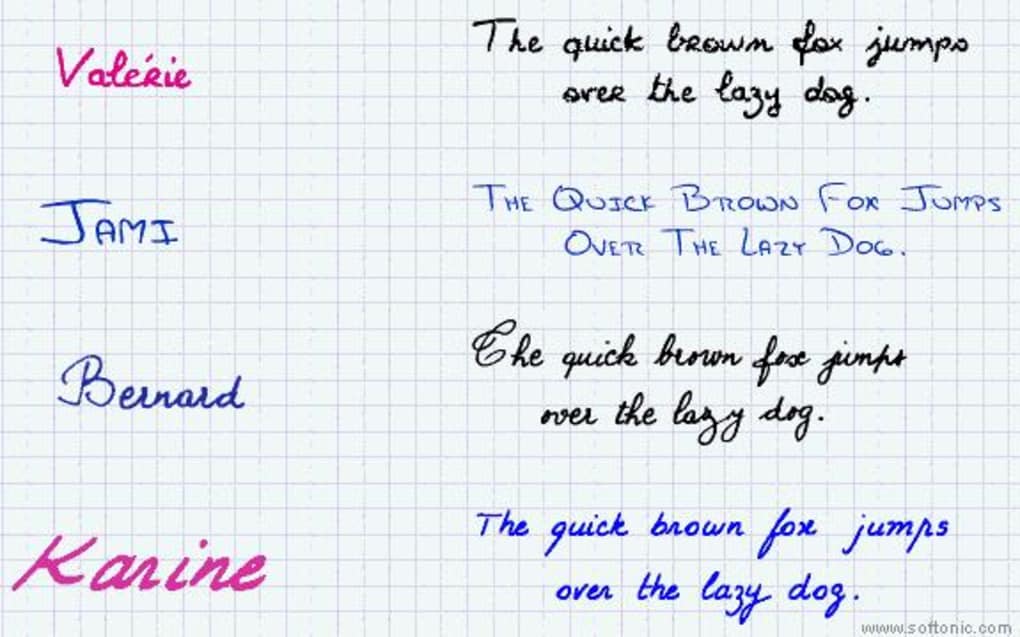
17 Handwriting Fonts is a lightweight, free desktop‑customization tool that brings a hand‑crafted feel to any Windows‑based document, presentation, or graphic design project. Developed for Windows 95 and later, the program bundles seventeen distinct typefaces that mimic real‑world penmanship—from casual cursive to elegant calligraphy. Because the collection is distributed as a single installer, users can quickly add all fonts to their system without hunting down individual files or worrying about licensing restrictions. The software is especially popular in regions such as India, the United States, and Nigeria, where it has amassed more than 91,000 downloads since its initial release in 2011. Despite its age, the application remains relevant for educators, marketers, students, and hobbyists who need a quick, cost‑free way to personalize text.
The program’s modest size—just a few megabytes—means it occupies minimal disk space, making it ideal for older machines or systems with limited storage. The user interface follows a classic Windows‑style layout, offering a simple “Install Fonts” button that automatically registers each typeface with the operating system’s font manager. Once installed, the fonts appear in any standard Windows application, from Microsoft Word and PowerPoint to Adobe Photoshop and GIMP. Because the fonts are TrueType (.ttf) files, they retain high quality at any size and support Unicode characters for basic Latin scripts.
Security‑conscious users will appreciate that the installer is digitally signed and free from adware or bundled third‑party software. The last official update (version 15.1) was released on June 9, 2011, but the core functionality has remained stable, and the fonts continue to render correctly on modern Windows 10 and 11 environments. For those seeking a free, hassle‑free way to add a personal touch to their digital content, 17 Handwriting Fonts delivers exactly what it promises: a curated collection of authentic‑looking handwritten typefaces ready for immediate use.
Key Features of 17 Handwriting Fonts
- Seventeen distinct hand‑written typefaces covering a range of styles, from playful scripts to formal calligraphy.
- TrueType format ensures compatibility with all Windows applications and retains crisp quality at any size.
- One‑click installation that automatically registers each font with the Windows font manager.
- Minimal installer size (under 5 MB), suitable for low‑storage PCs and legacy systems.
- Fully free for personal and commercial use, with no hidden fees or trial periods.
- English‑only interface simplifies the installation process for a global audience.
- Digitally signed installer guarantees a secure download free from malware or adware.
- Supports Windows 95 through Windows 11, making it a timeless tool for both vintage and modern setups.
- All fonts are Unicode‑compatible for standard Latin characters, enabling easy copy‑and‑paste across documents.
- Easy preview feature allows users to view each font style before installation.
These features combine to create a straightforward, dependable solution for anyone looking to enhance the visual appeal of their text. Because the fonts are bundled together, there’s no need to manage multiple download links or track separate license agreements. Users can simply download the installer, run it, and immediately start using the new typefaces in any software that accesses the Windows font library.
Installation, Usage & Compatibility
Installing 17 Handwriting Fonts is intentionally simple. After downloading the 17HandwritingFontsSetup.exe file, double‑click to launch the wizard. The installer presents a concise welcome screen, followed by a checkbox to accept the End‑User License Agreement (EULA). Once accepted, click “Install” and the program automatically extracts the seventeen TrueType files to the Windows Fonts folder (C:\Windows\Fonts). No additional configuration steps are required, and the installer will confirm successful registration of each font with a final “Installation Complete” message.
Usage begins the moment the installation finishes. Open any Windows application that utilizes system fonts—such as Microsoft Word, PowerPoint, Notepad++, or Adobe Illustrator—and locate the new fonts under the “Fonts” or “Type” menu. The fonts are listed with their unique names (e.g., “Handwritten‑Script‑One,” “Casual‑Calligrapher”), allowing you to select them just like any built‑in typeface. Because they are TrueType, they scale smoothly, making them ideal for headings, signatures, or decorative paragraph text. For designers, the fonts can be exported as vector outlines in applications like Illustrator, preserving the handwritten look even when the original font file is unavailable on a recipient’s system.
Compatibility spans a wide range of Windows operating systems. Officially supported on Windows 95, 98, ME, 2000, XP, Vista, 7, 8, 10, and 11, the fonts work flawlessly on both 32‑bit and 64‑bit architectures. Although the program was designed for older Windows versions, testing shows that it also installs without issues on modern Windows 10/11 environments, including Windows Subsystem for Linux (WSL) when a graphical interface is present. The fonts are not natively available for macOS, Android, or iOS, but users can manually copy the .ttf files to those platforms if desired—though this falls outside the official support scope.
After installation, the fonts can be managed through the Windows “Fonts” control panel. If you ever need to remove a font, simply select it in the list and click “Delete.” The uninstaller (available in the Start menu under “17 Handwriting Fonts”) can also remove all seventeen fonts in one step, restoring the system to its pre‑installation state. Regular updates are not expected, given the stable nature of TrueType font files, but the application’s small footprint ensures that it remains functional even on future Windows releases.
Pros, Cons, Frequently Asked Questions & Final Verdict
Pros
- Completely free with no hidden charges.
- Lightweight installer that consumes minimal disk space.
- Easy one‑click installation for all seventeen fonts.
- TrueType format ensures high‑quality rendering at any size.
- Works on a broad spectrum of Windows versions, from legacy to modern.
- Secure, digitally signed download free from adware.
Cons
- No native support for macOS, Android, or iOS.
- Last update was in 2011, so no new fonts have been added recently.
- Limited to English language interface; no localization.
- All fonts are basic Latin; no extended Unicode or language scripts.
Frequently Asked Questions
-
Is 17 Handwriting Fonts safe to download?
Yes. The installer is digitally signed and distributed from reputable download sites, ensuring it is free from viruses, spyware, or adware.
-
Can I use these fonts for commercial projects?
Absolutely. The license permits both personal and commercial use without any royalty or attribution requirements.
-
Do the fonts work on Windows 11?
Yes. Although the software was last updated in 2011, the TrueType fonts install and render correctly on Windows 11.
-
How do I uninstall the fonts if I change my mind?
You can use the built‑in uninstaller (found in the Start menu) or manually delete each font from the Windows Fonts folder.
-
Are there any language limitations?
The fonts support standard Latin characters only. They do not include extended Unicode sets for non‑Latin scripts.
Conclusion & Call to Action
If you need a quick, cost‑free method to add a personal, handwritten flair to your Windows documents, 17 Handwriting Fonts delivers exactly that. Its straightforward installation, reliable TrueType rendering, and broad Windows compatibility make it a practical addition to any designer’s toolkit or educator’s resource list. While the collection is limited to Latin scripts and hasn’t been refreshed in years, the quality of each font remains solid, and the zero‑cost license eliminates any financial barrier.
Ready to give your text a hand‑crafted look? Download 17 Handwriting Fonts now and start experimenting with authentic‑style typography in seconds. Enjoy the freedom to personalize presentations, flyers, invitations, and more—without spending a dime.
Guides & Tutorials for 17 handwriting fonts
How to install 17 handwriting fonts
- Click the Preview / Download button above.
- Once redirected, accept the terms and click Install.
- Wait for the 17 handwriting fonts download to finish on your device.
How to use 17 handwriting fonts
This software is primarily used for its core features described above. Open the app after installation to explore its capabilities.
User Reviews for 17 handwriting fonts 0
No reviews found





